> ## Documentation Index
> Fetch the complete documentation index at: https://docs.teio.me/llms.txt
> Use this file to discover all available pages before exploring further.

# Cline

> 在终端和 VS Code 中配置 Teio API 使用 Cline AI 编程助手

> Cline 是一款内置于编辑器和终端的 AI 编码助手。它可以读写文件、运行终端命令、使用浏览器，并通过自然对话帮助您构建功能

## 前置条件

* 已 [创建 API 密钥](/create-token)
* 已安装 Node.js 18+

## 安装 Cline

```bash theme={null}
npm install -g cline
```

## 配置并启动

安装完成后，在终端运行配置：

```bash theme={null}
cline auth
```

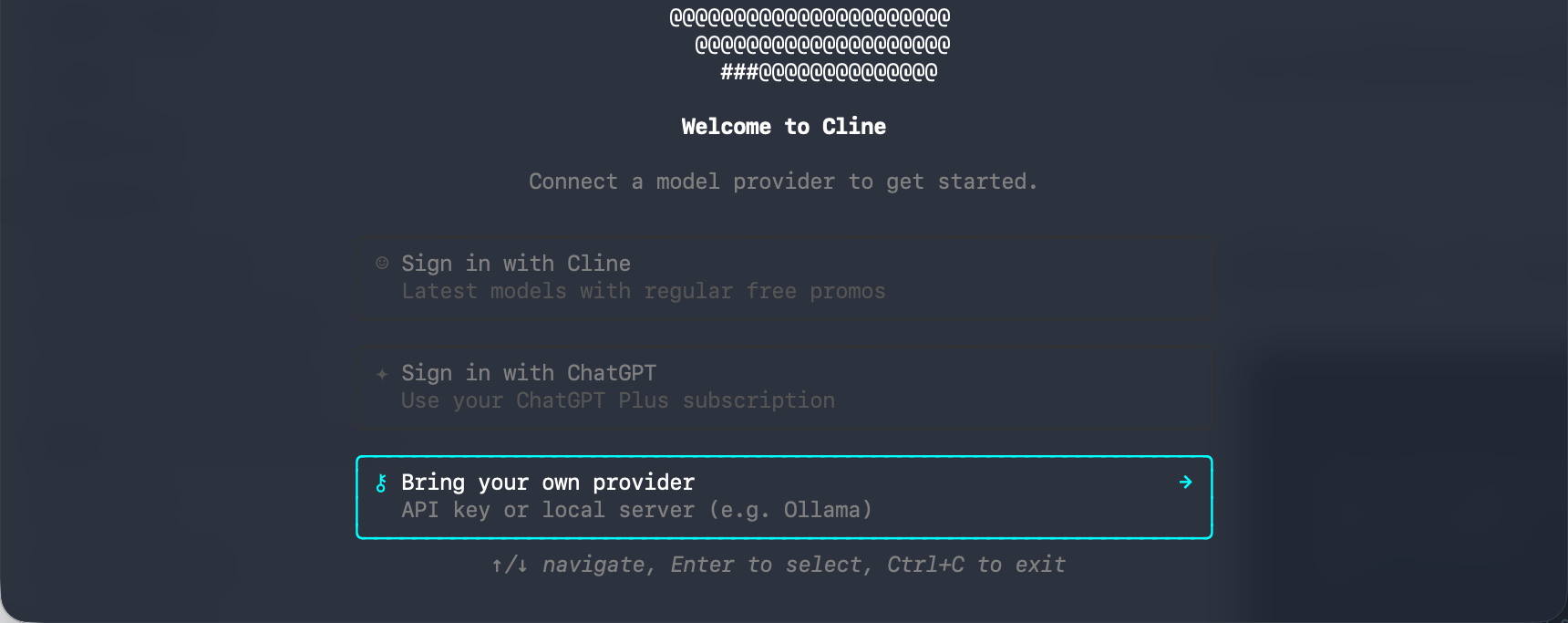
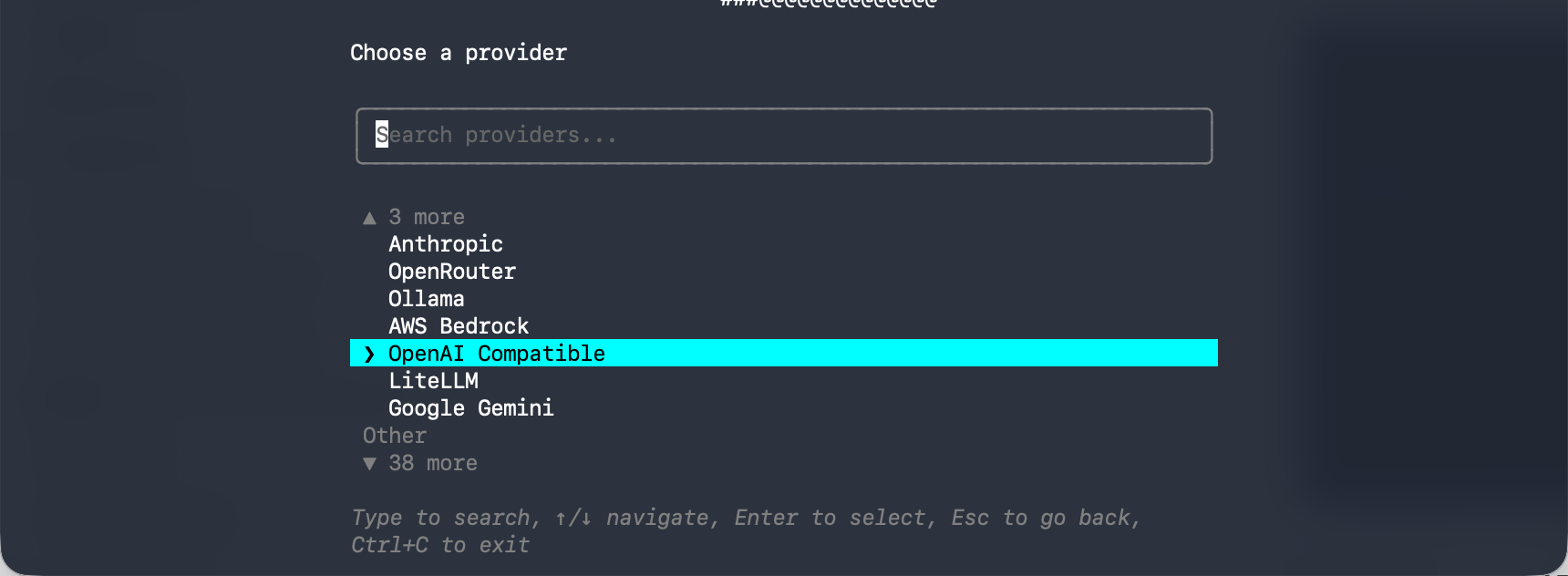
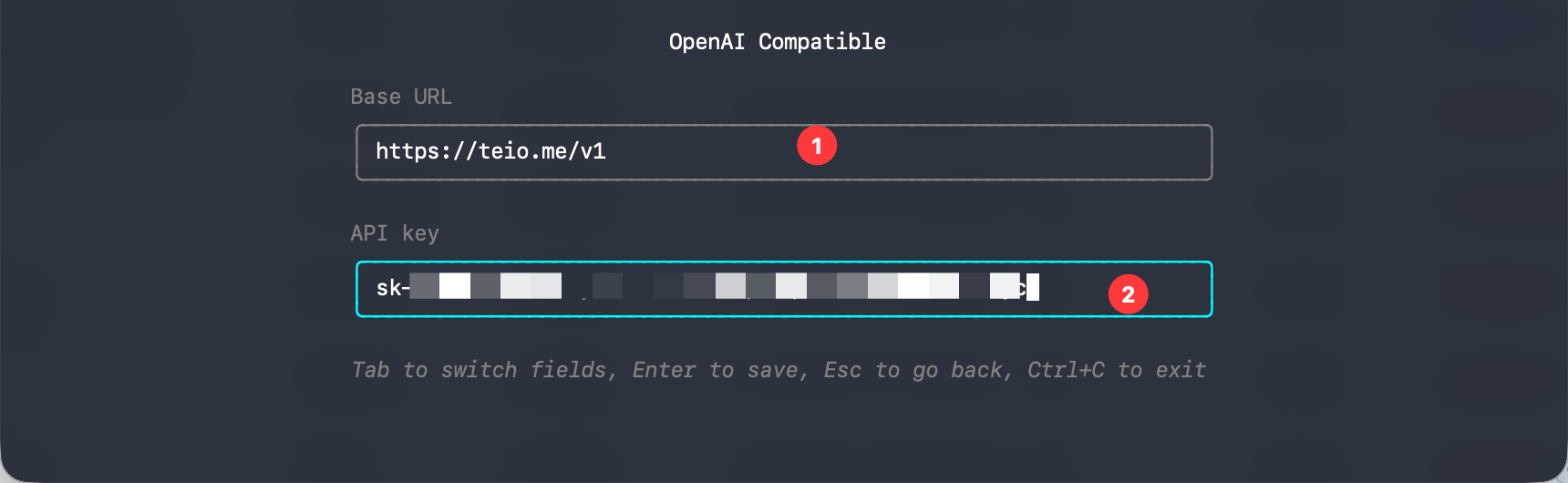
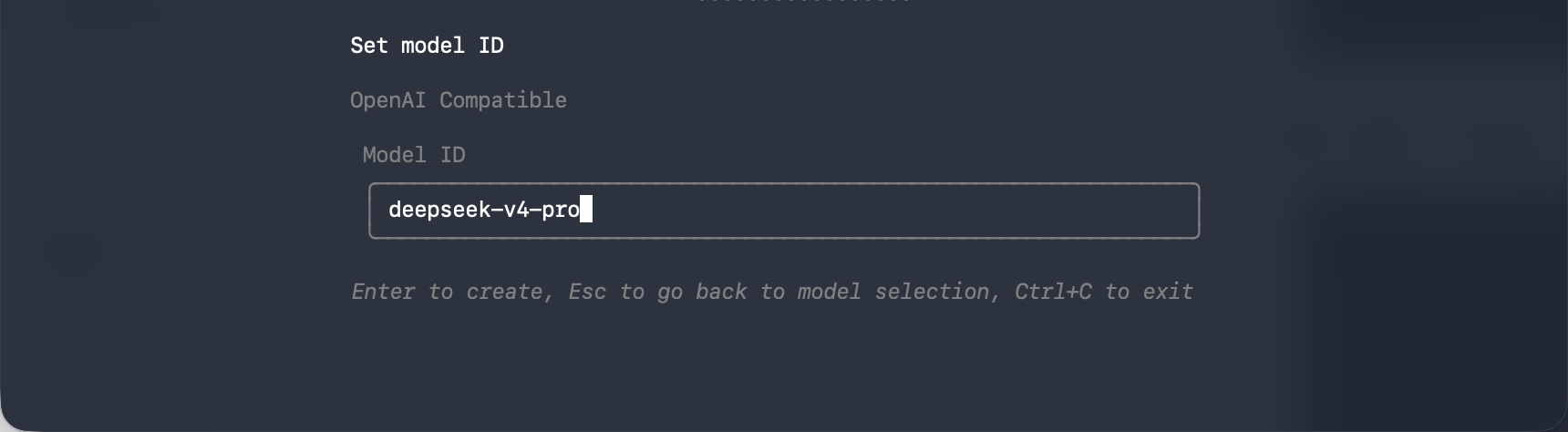
Cline 会引导你完成 API 配置，依次操作如下图

1. 选择从哪开始：`Bring your own provider`
   <Frame>
     <img src="https://mintcdn.com/cdhyzxwl/XrQ8R_I9a-jmTzVG/images/Screenshot-2026-05-28-at-16-20-47.png?fit=max&auto=format&n=XrQ8R_I9a-jmTzVG&q=85&s=713e10b6dff3d819edff02e3a0d83bcd" alt="Screenshot 2026 05 28 At 16 20 47" width="1720" height="683" data-path="images/Screenshot-2026-05-28-at-16-20-47.png" />
   </Frame>
2. 选择提供商：`OpenAI Compatible`
   <Frame>
     <img src="https://mintcdn.com/cdhyzxwl/XrQ8R_I9a-jmTzVG/images/Screenshot-2026-05-28-at-16-23-48.png?fit=max&auto=format&n=XrQ8R_I9a-jmTzVG&q=85&s=76643629752c5bd08ce2b4f02d5cd912" alt="Screenshot 2026 05 28 At 16 23 48" width="1720" height="632" data-path="images/Screenshot-2026-05-28-at-16-23-48.png" />
   </Frame>
3. 输入 地址：`https://teio.me/v1`   和 API 密钥
   <Frame>
     <img src="https://mintcdn.com/cdhyzxwl/XrQ8R_I9a-jmTzVG/images/Screenshot-2026-05-28-at-16-25-04.png?fit=max&auto=format&n=XrQ8R_I9a-jmTzVG&q=85&s=bbd900ad1d5977a689bf88ebeb830bf4" alt="Screenshot 2026 05 28 At 16 25 04" width="1720" height="530" data-path="images/Screenshot-2026-05-28-at-16-25-04.png" />
   </Frame>
4. 输入想要的模型：`deepseek-v4-pro`
   <Frame>
     <img src="https://mintcdn.com/cdhyzxwl/XrQ8R_I9a-jmTzVG/images/Screenshot-2026-05-28-at-16-27-12.png?fit=max&auto=format&n=XrQ8R_I9a-jmTzVG&q=85&s=ccfcacb77574f6925570a246f733bf7e" alt="Screenshot 2026 05 28 At 16 27 12" width="1720" height="474" data-path="images/Screenshot-2026-05-28-at-16-27-12.png" />
   </Frame>
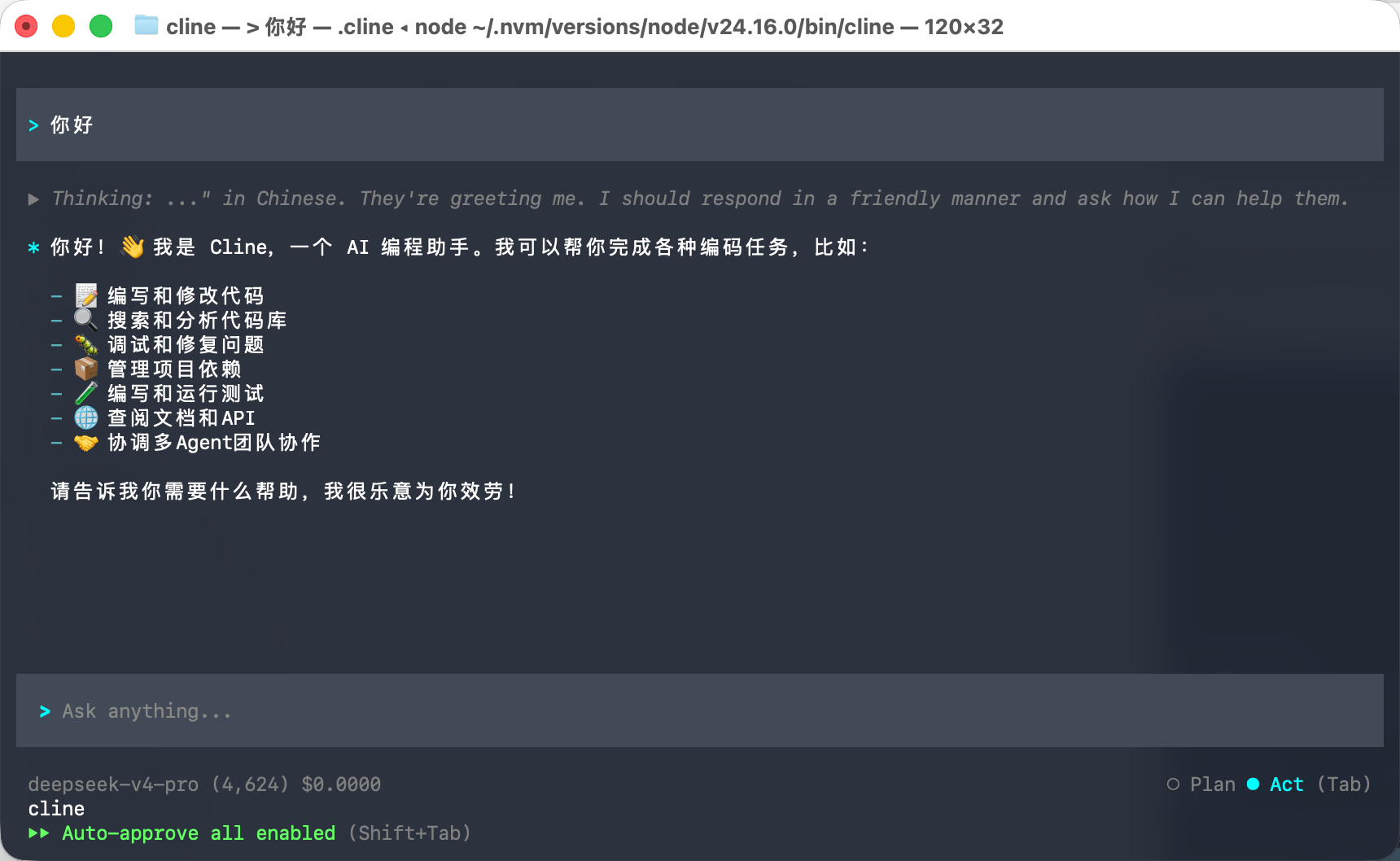
5. 配置完成后 重新输入 `cline` 唤醒 即可开始使用。
   <Frame>
     <img src="https://mintcdn.com/cdhyzxwl/XrQ8R_I9a-jmTzVG/images/Screenshot-2026-05-28-at-16-28-20.png?fit=max&auto=format&n=XrQ8R_I9a-jmTzVG&q=85&s=262fa7f22d467344cdb9b8bc61b32557" alt="Screenshot 2026 05 28 At 16 28 20" width="1720" height="1058" data-path="images/Screenshot-2026-05-28-at-16-28-20.png" />
   </Frame>

## 在 VS Code 中使用

Cline 也提供了 VS Code 扩展，可以直接在编辑器中使用。

### 安装扩展

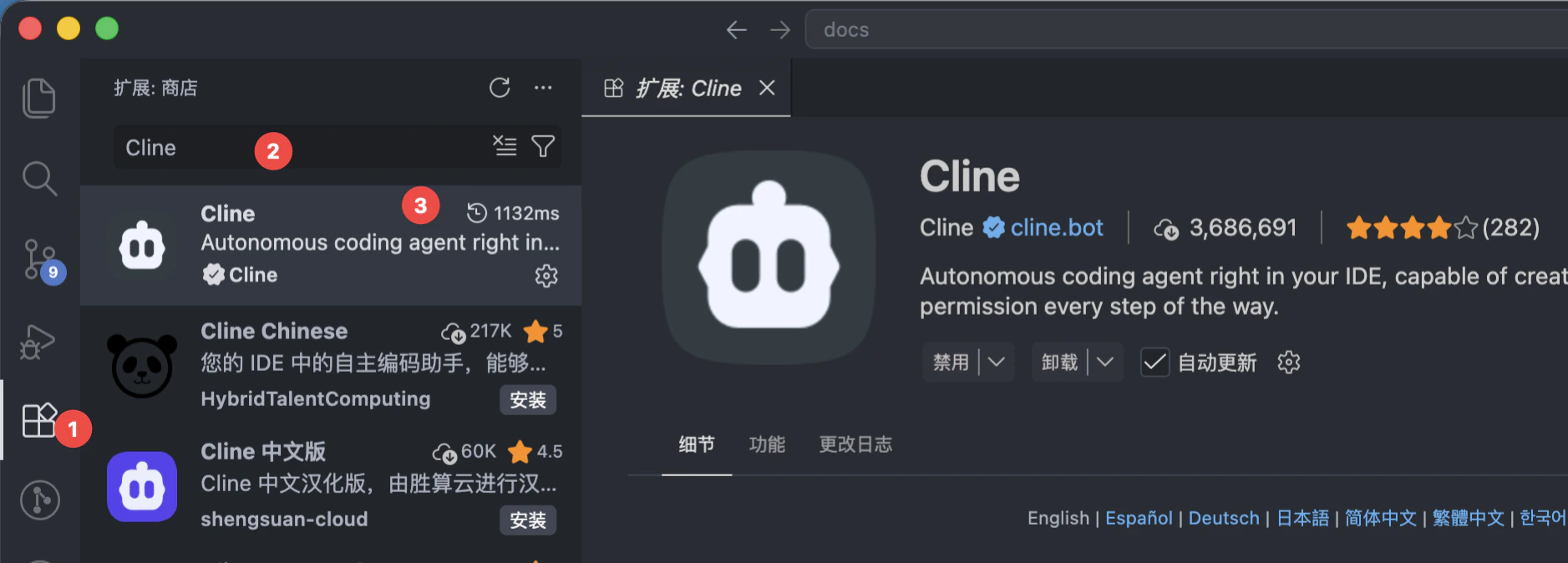
1. 打开 VS Code
2. 按 `Ctrl+Shift+X`（macOS 为 `Cmd+Shift+X`）打开扩展面板
3. 搜索 **Cline** 并安装

<Frame>
  <img src="https://mintcdn.com/cdhyzxwl/Yq1yTRSTy1uRtlwU/images/macshot-clipboard-032572BA-6DEC-4B30-BB3F-999FFF5DF01D.png?fit=max&auto=format&n=Yq1yTRSTy1uRtlwU&q=85&s=5f9523ed2581b44336a62540ff92bb68" alt="Macshot Clipboard 032572BA 6DEC 4B30 BB3F 999FFF5DF01D" width="1877" height="674" data-path="images/macshot-clipboard-032572BA-6DEC-4B30-BB3F-999FFF5DF01D.png" />
</Frame>

### 配置扩展

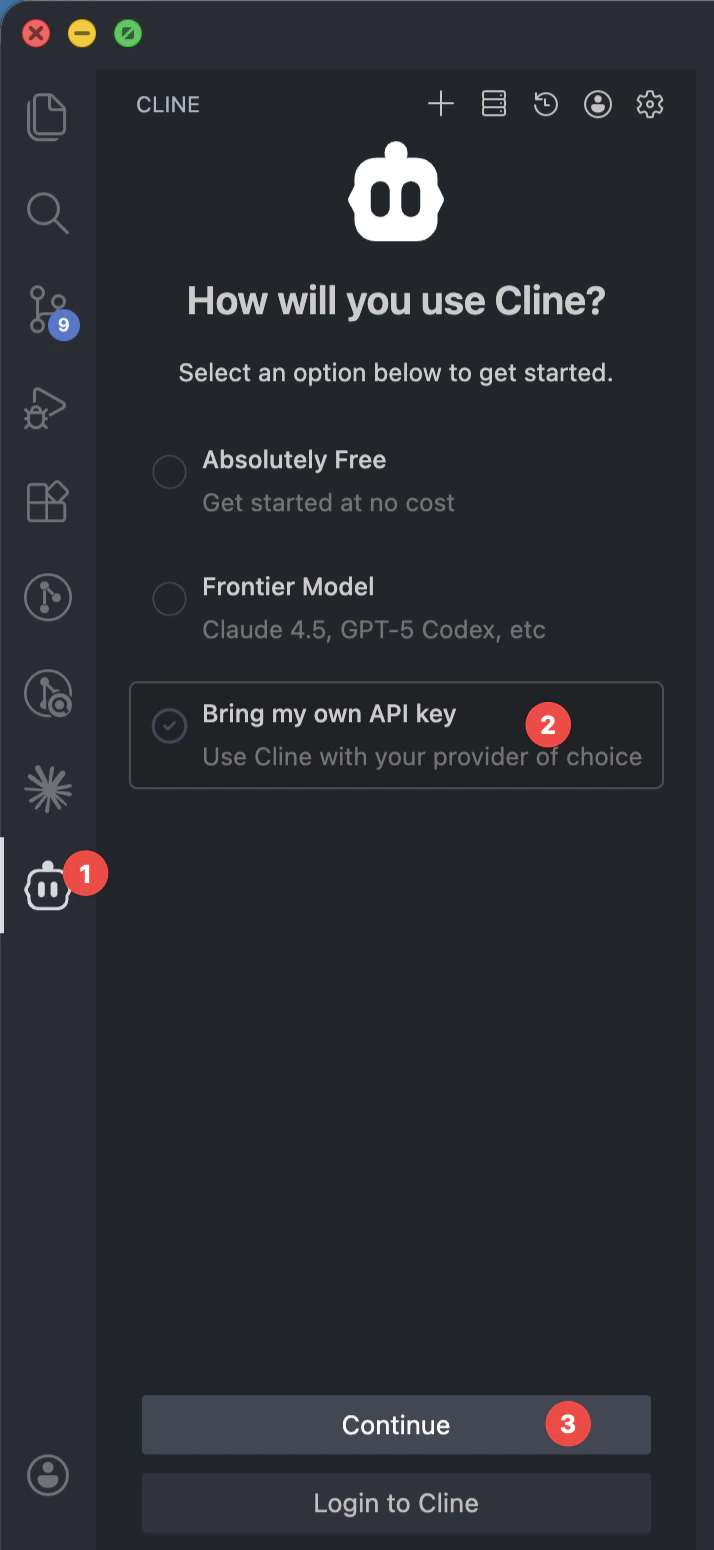
1. 安装完成后，点击 VS Code 侧边栏的 Cline 图标打开面板，如下图操作
   <Frame>
     <img src="https://mintcdn.com/cdhyzxwl/Yq1yTRSTy1uRtlwU/images/macshot-clipboard-DB9C5C7F-D074-4222-9C0F-7C9DC03E780D-1.png?fit=max&auto=format&n=Yq1yTRSTy1uRtlwU&q=85&s=3c12a375ca4199d58b6d397ed747b8f1" alt="Macshot Clipboard DB9C5C7F D074 4222 9C0F 7C9DC03E780D" width="714" height="1550" data-path="images/macshot-clipboard-DB9C5C7F-D074-4222-9C0F-7C9DC03E780D-1.png" />
   </Frame>
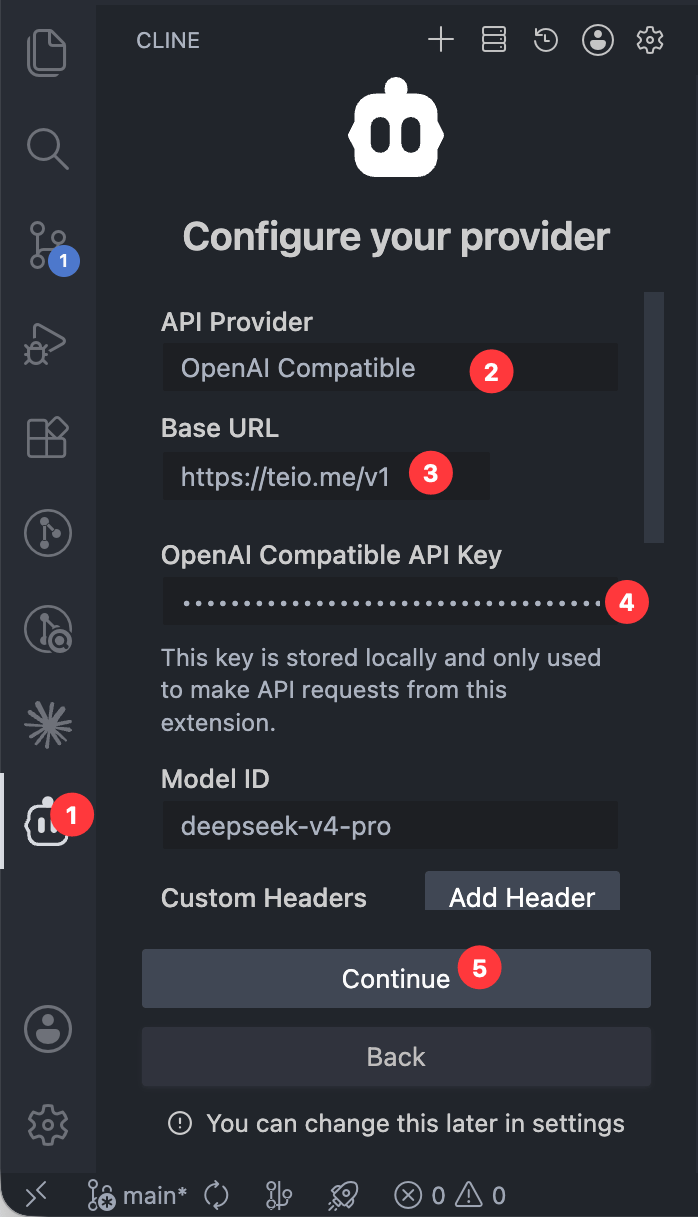
2. 在 **API Provider** 下拉菜单中选择 **OpenAI Compatible**
3. 填写以下信息：
   * **Base URL**：`https://teio.me/v1`
   * **API Key**：`你的密钥`
   * **Model ID**：填写你要使用的模型名称，例如 `deepseek-v4-pro`
   <Frame>
     <img src="https://mintcdn.com/cdhyzxwl/XrQ8R_I9a-jmTzVG/images/Screenshot-2026-05-28-at-16-30-39.png?fit=max&auto=format&n=XrQ8R_I9a-jmTzVG&q=85&s=7c4ae4767725836ff54ebf73f96f363d" alt="Screenshot 2026 05 28 At 16 30 39" width="698" height="1217" data-path="images/Screenshot-2026-05-28-at-16-30-39.png" />
   </Frame>

### 使用

配置完成后，直接在 Cline 面板的对话框中输入你的编程需求即可。Cline 会读取你的项目文件、执行终端命令、编辑代码，帮助你完成开发任务。

## 常见问题

遇到问题？请参考 [常见问题](/faq)。