> ## Documentation Index
> Fetch the complete documentation index at: https://docs.teio.me/llms.txt
> Use this file to discover all available pages before exploring further.

# OpenClaw

> 在 OpenClaw AI 编程助手中配置并使用 Teio API

> OpenClaw 是一个**自托管 Gateway 网关**，可通过内置渠道或外部渠道插件，将 Discord、Google Chat、iMessage、Matrix、Microsoft Teams、Signal、Slack、Telegram、WhatsApp、Zalo 等常用聊天应用连接到 Pi 等 AI 编码智能体。只需在自己的电脑或服务器上运行 Gateway 进程，即可在消息应用中随时使用 AI 助手。

## 前置条件

* 已 [创建 API 密钥](/create-token)
* 若选择通过 NPM 安装，则需要 Node.js 24+ LTS 版本

## 安装 OpenClaw

<Tabs>
  <Tab title="macOS">
    一键安装（推荐）：

    ```bash theme={null}
    curl -fsSL https://openclaw.ai/install.sh | bash
    ```

    或通过 NPM：

    ```bash theme={null}
    npm install -g openclaw
    ```
  </Tab>

  <Tab title="Windows">
    通过 NPM：

    ```bash theme={null}
    npm install -g openclaw
    ```
  </Tab>
</Tabs>

## 配置

安装完成后，在终端运行：

```bash theme={null}
openclaw onboard --skip-skills
```

选择 yes，然后按回车键。

<Frame>
  <img src="https://mintcdn.com/cdhyzxwl/XCW4VnODSJplAy92/images/Screenshot-2026-08-07-at-15-15-38.png?fit=max&auto=format&n=XCW4VnODSJplAy92&q=85&s=31eceef65cdf57d89c8fe1e8ec2609ca" alt="Screenshot 2026 08 07 At 15 15 38" width="1720" height="252" data-path="images/Screenshot-2026-08-07-at-15-15-38.png" />
</Frame>

选择 QuickStart 快速安装模式。

<Frame>
  <img src="https://mintcdn.com/cdhyzxwl/XCW4VnODSJplAy92/images/Screenshot-2026-08-07-at-15-16-25.png?fit=max&auto=format&n=XCW4VnODSJplAy92&q=85&s=227f269524d0b048350c9259d95c9216" alt="Screenshot 2026 08 07 At 15 16 25" width="1720" height="231" data-path="images/Screenshot-2026-08-07-at-15-16-25.png" />
</Frame>

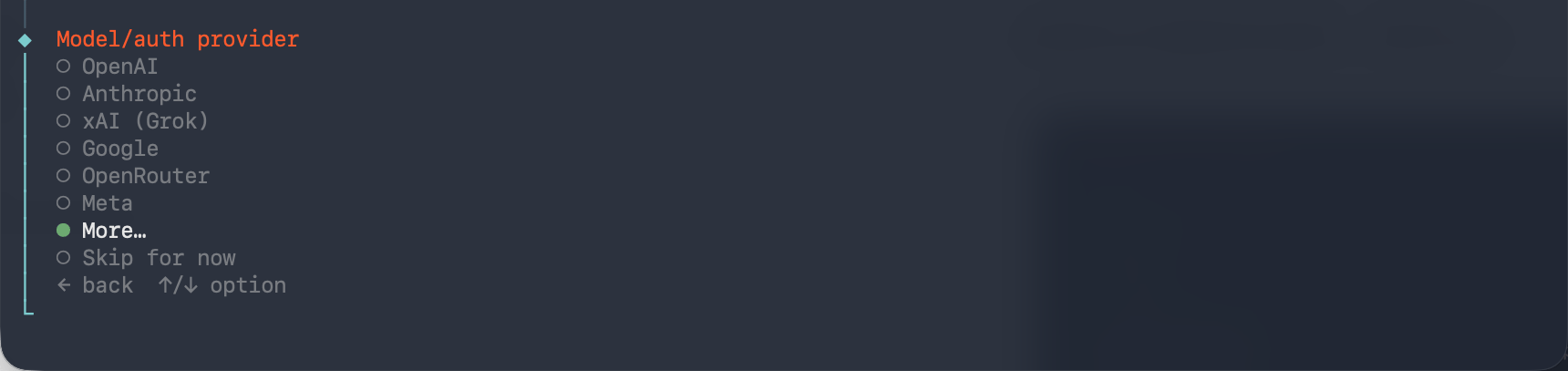
选择模型供应商时，选择 More。

<Frame>
  <img src="https://mintcdn.com/cdhyzxwl/XCW4VnODSJplAy92/images/Screenshot-2026-08-07-at-15-17-48.png?fit=max&auto=format&n=XCW4VnODSJplAy92&q=85&s=7df7730858ffc79905a8827219ca682c" alt="Screenshot 2026 08 07 At 15 17 48" width="1720" height="407" data-path="images/Screenshot-2026-08-07-at-15-17-48.png" />
</Frame>

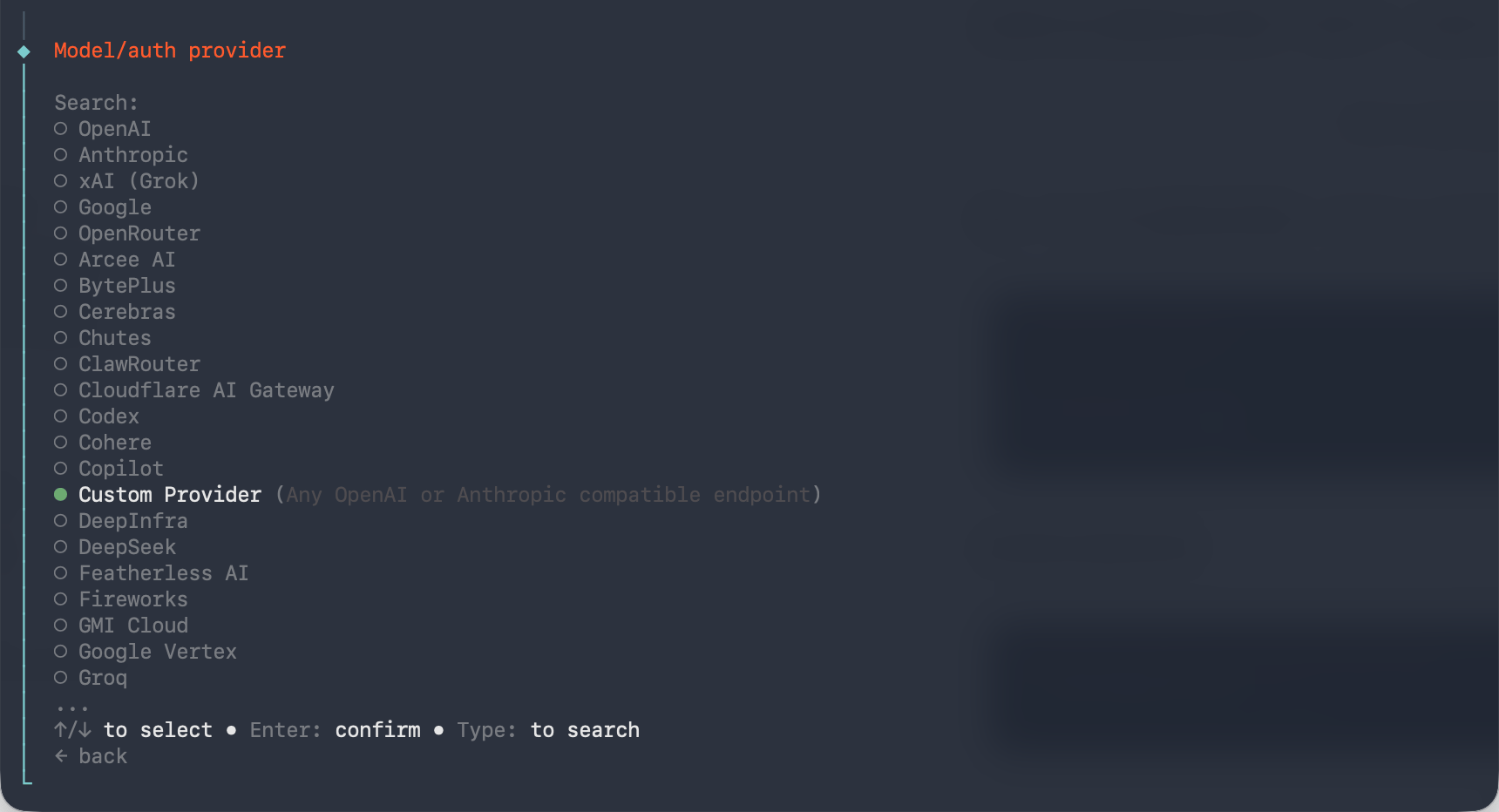
继续向下查找并选择 Custom Provider。

<Frame>
  <img src="https://mintcdn.com/cdhyzxwl/XCW4VnODSJplAy92/images/Screenshot-2026-08-07-at-15-18-35.png?fit=max&auto=format&n=XCW4VnODSJplAy92&q=85&s=eb457d452429c437d053213e725aae7b" alt="Screenshot 2026 08 07 At 15 18 35" width="1720" height="932" data-path="images/Screenshot-2026-08-07-at-15-18-35.png" />
</Frame>

输入 API 基础 URL：`https://teio.me/v1`

<Frame>
  <img src="https://mintcdn.com/cdhyzxwl/XCW4VnODSJplAy92/images/Screenshot-2026-08-07-at-15-19-02.png?fit=max&auto=format&n=XCW4VnODSJplAy92&q=85&s=17a905d310140a0ed53d70a2d990787d" alt="Screenshot 2026 08 07 At 15 19 02" width="1720" height="268" data-path="images/Screenshot-2026-08-07-at-15-19-02.png" />
</Frame>

选择立即提供密钥。

<Frame>
  <img src="https://mintcdn.com/cdhyzxwl/XCW4VnODSJplAy92/images/Screenshot-2026-08-07-at-15-19-43.png?fit=max&auto=format&n=XCW4VnODSJplAy92&q=85&s=a7d4e98b82240e5c0107c4d44caac84f" alt="Screenshot 2026 08 07 At 15 19 43" width="1720" height="281" data-path="images/Screenshot-2026-08-07-at-15-19-43.png" />
</Frame>

输入对应的 API 密钥：`你的密钥`

<Frame>
  <img src="https://mintcdn.com/cdhyzxwl/XCW4VnODSJplAy92/images/Screenshot-2026-08-07-at-15-20-10.png?fit=max&auto=format&n=XCW4VnODSJplAy92&q=85&s=88ab056b2944eb52b28db6670608d44b" alt="Screenshot 2026 08 07 At 15 20 10" width="1720" height="191" data-path="images/Screenshot-2026-08-07-at-15-20-10.png" />
</Frame>

兼容性选择 OpenAI，保留默认设置即可。

<Frame>
  <img src="https://mintcdn.com/cdhyzxwl/XCW4VnODSJplAy92/images/Screenshot-2026-08-07-at-15-20-31.png?fit=max&auto=format&n=XCW4VnODSJplAy92&q=85&s=96a41d971c70031a3524800e74d2800c" alt="Screenshot 2026 08 07 At 15 20 31" width="1720" height="259" data-path="images/Screenshot-2026-08-07-at-15-20-31.png" />
</Frame>

输入模型 ID：`deepseek-v4-pro`。模型 ID 可从 API 密钥的可用模型列表中直接复制粘贴。

等待验证成功后，再进行下一步。

<Frame>
  <img src="https://mintcdn.com/cdhyzxwl/XCW4VnODSJplAy92/images/Screenshot-2026-08-07-at-15-22-19.png?fit=max&auto=format&n=XCW4VnODSJplAy92&q=85&s=f5364df1e50838b79c30ae32304a9ef2" alt="Screenshot 2026 08 07 At 15 22 19" width="1720" height="173" data-path="images/Screenshot-2026-08-07-at-15-22-19.png" />
</Frame>

<Warning>
  验证过程偶尔可能返回错误，重试通常即可成功。如果持续失败，请检查 API 密钥是否正确、网络是否通畅、后台密钥分组是否有选择对应分组。
</Warning>

系统会自动显示模型提供商的 Endpoint ID，无需修改，直接按回车键。

<Frame>
  <img src="https://mintcdn.com/cdhyzxwl/XCW4VnODSJplAy92/images/Screenshot-2026-08-07-at-15-22-41.png?fit=max&auto=format&n=XCW4VnODSJplAy92&q=85&s=f3a4e5cb2c7847e12f366b4dba784b9f" alt="Screenshot 2026 08 07 At 15 22 41" width="1720" height="180" data-path="images/Screenshot-2026-08-07-at-15-22-41.png" />
</Frame>

根据需要设置别名，也可以不作修改，直接按回车键。

<Frame>
  <img src="https://mintcdn.com/cdhyzxwl/XCW4VnODSJplAy92/images/Screenshot-2026-08-07-at-15-23-04.png?fit=max&auto=format&n=XCW4VnODSJplAy92&q=85&s=01b1fee5fefe23ba9d50d708b84f307e" alt="Screenshot 2026 08 07 At 15 23 04" width="1720" height="174" data-path="images/Screenshot-2026-08-07-at-15-23-04.png" />
</Frame>

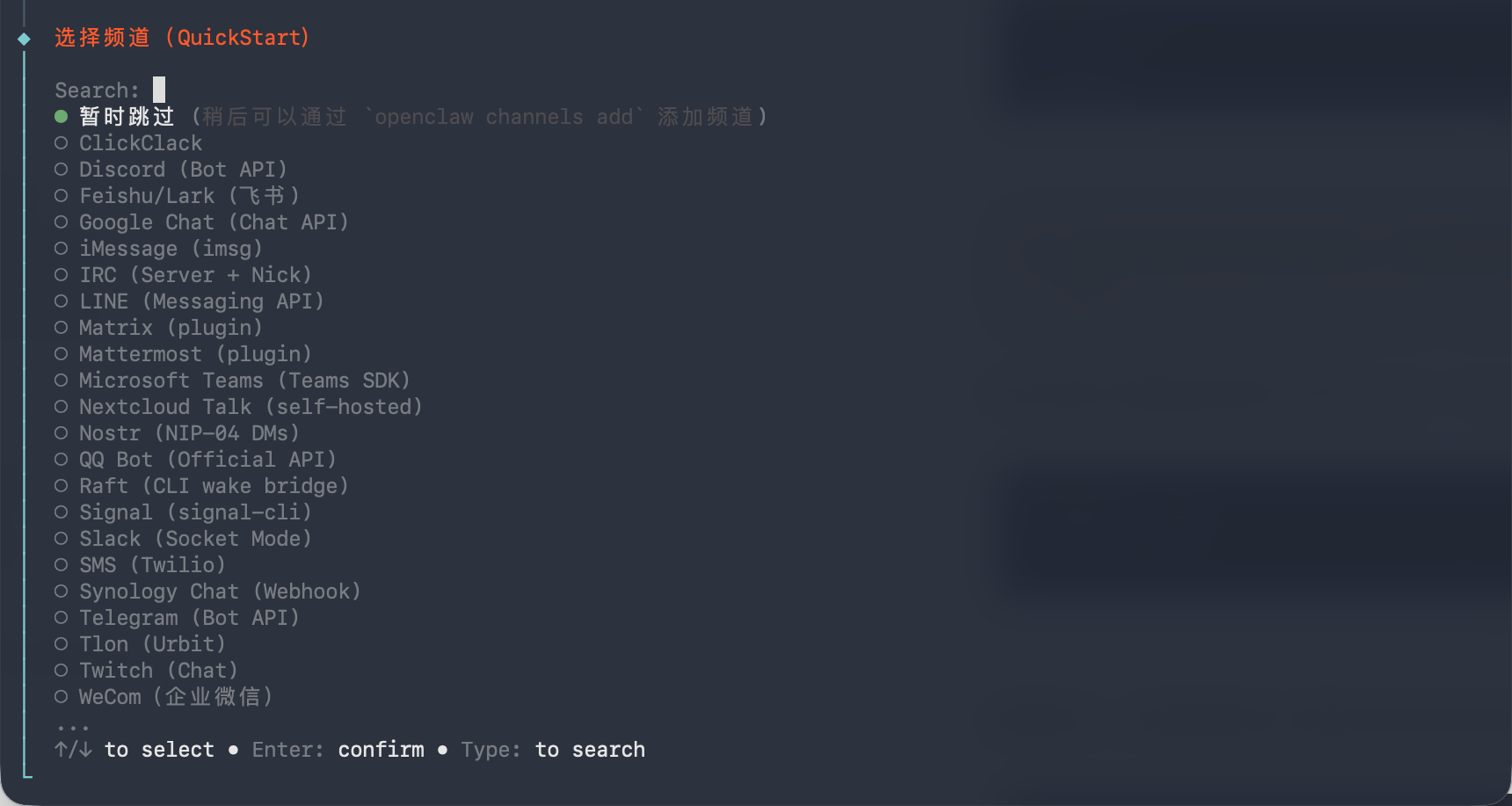
选择频道，此处跳过即可。

<Frame>
  <img src="https://mintcdn.com/cdhyzxwl/XCW4VnODSJplAy92/images/Screenshot-2026-08-07-at-15-23-53.png?fit=max&auto=format&n=XCW4VnODSJplAy92&q=85&s=5f58863e4937aa67d01212ad5cee55d0" alt="Screenshot 2026 08 07 At 15 23 53" width="1720" height="917" data-path="images/Screenshot-2026-08-07-at-15-23-53.png" />
</Frame>

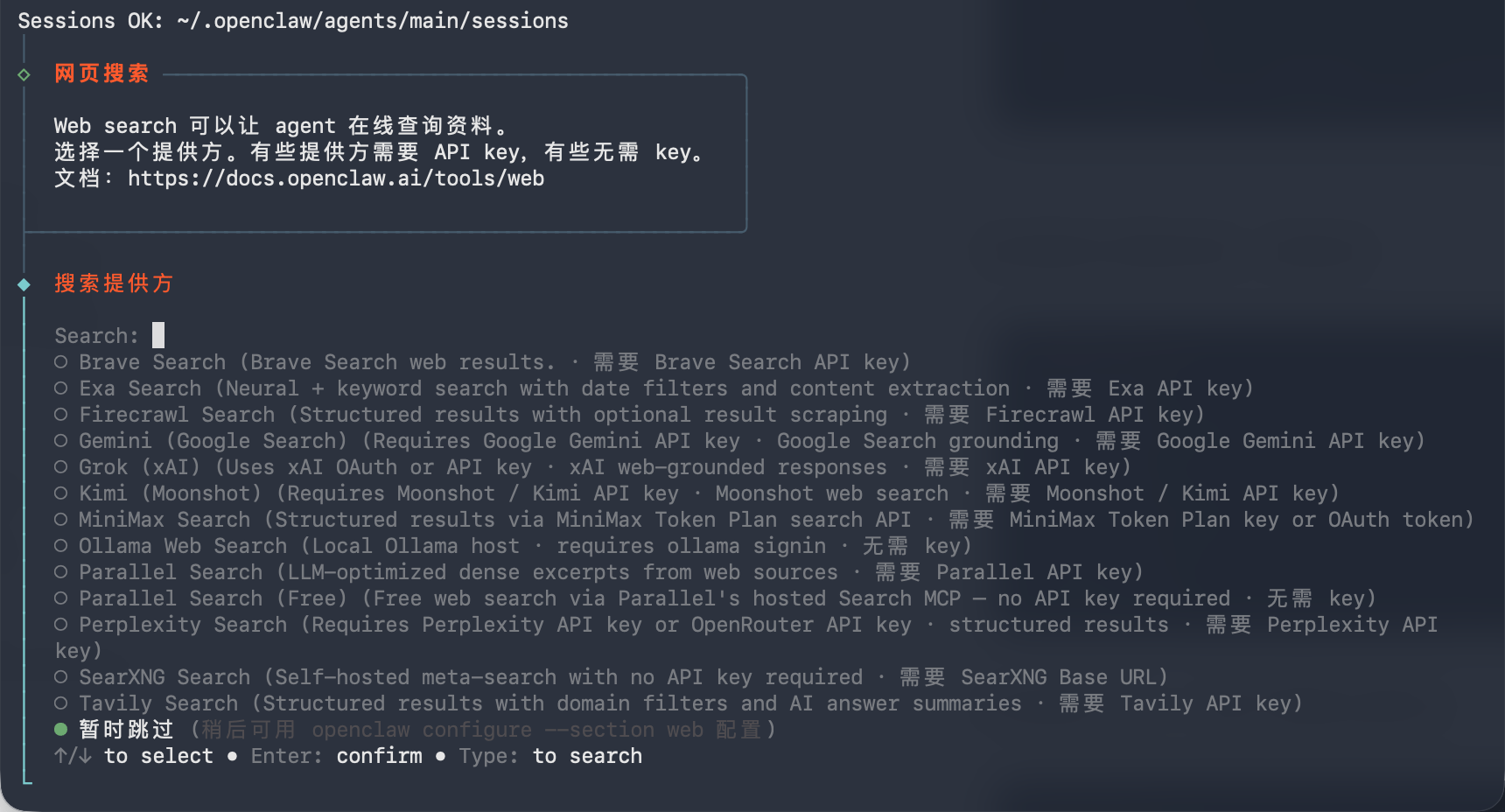
选择搜索引擎提供商，此处跳过即可。

<Frame>
  <img src="https://mintcdn.com/cdhyzxwl/XCW4VnODSJplAy92/images/Screenshot-2026-08-07-at-15-24-21.png?fit=max&auto=format&n=XCW4VnODSJplAy92&q=85&s=01b9774973405cf2aaddbe1d852d7f13" alt="Screenshot 2026 08 07 At 15 24 21" width="1720" height="928" data-path="images/Screenshot-2026-08-07-at-15-24-21.png" />
</Frame>

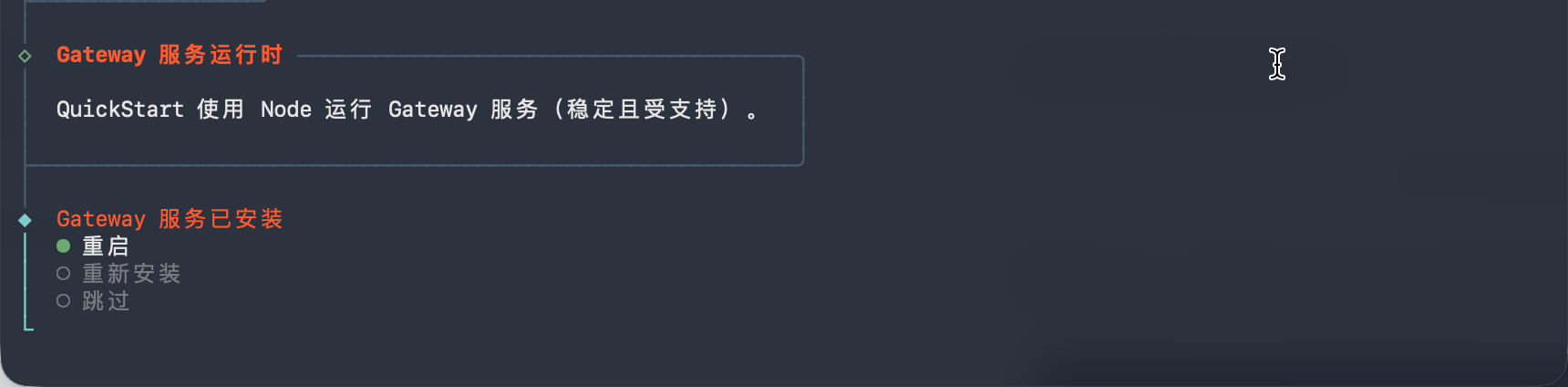
接下来，等待网关安装完成并启动。

<Frame>
  <img src="https://mintcdn.com/cdhyzxwl/XCW4VnODSJplAy92/images/Screenshot-2026-08-07-at-15-25-01.png?fit=max&auto=format&n=XCW4VnODSJplAy92&q=85&s=7680b746a3af42cf318b34216594de68" alt="Screenshot 2026 08 07 At 15 25 01" width="1720" height="424" data-path="images/Screenshot-2026-08-07-at-15-25-01.png" />
</Frame>

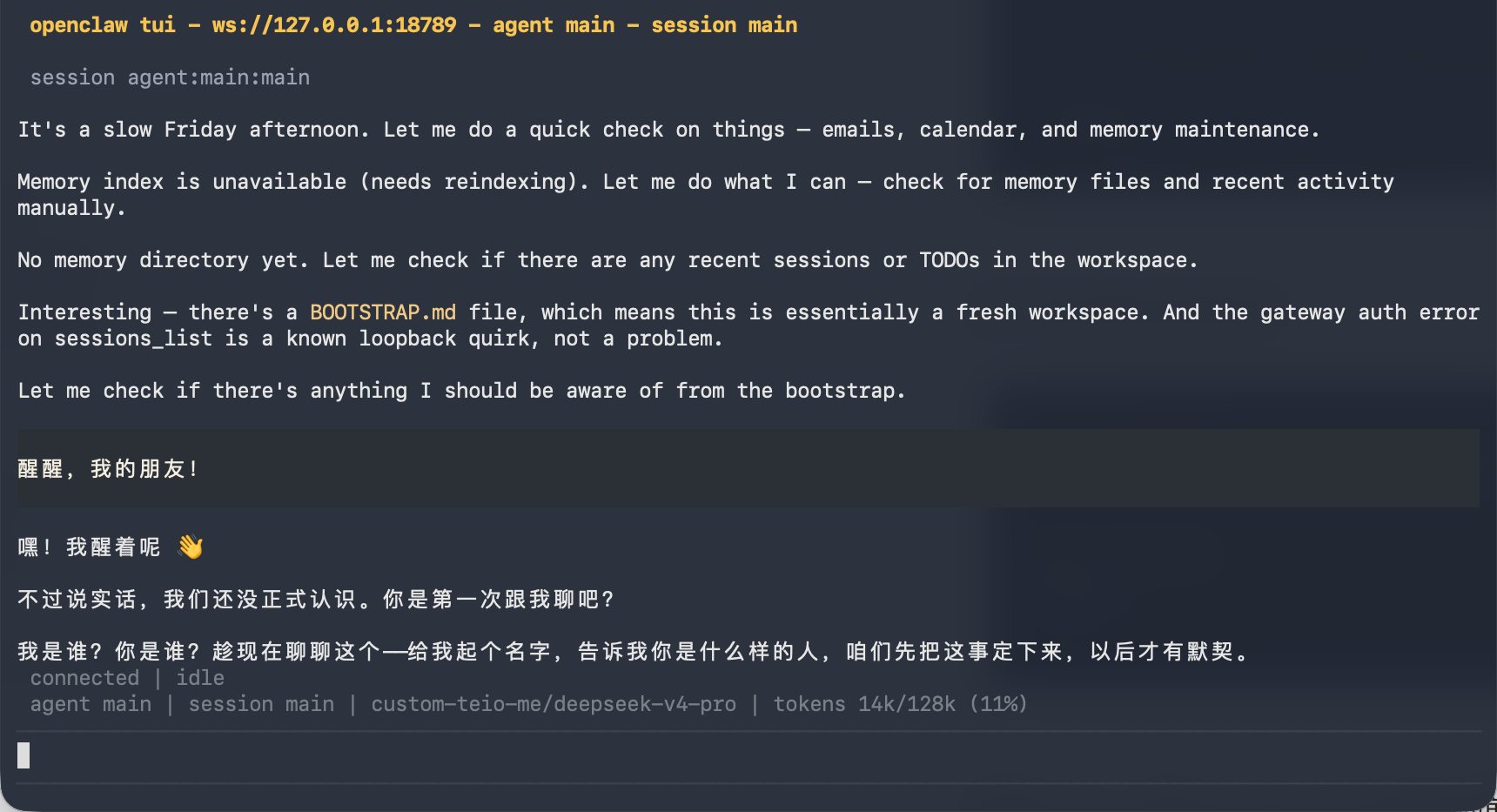
启动后，即可与 OpenClaw 对话。

<Frame>
  <img src="https://mintcdn.com/cdhyzxwl/XCW4VnODSJplAy92/images/Screenshot-2026-08-07-at-15-25-36.png?fit=max&auto=format&n=XCW4VnODSJplAy92&q=85&s=04313072fd5aab032b22f70667346932" alt="Screenshot 2026 08 07 At 15 25 36" width="1720" height="933" data-path="images/Screenshot-2026-08-07-at-15-25-36.png" />
</Frame>

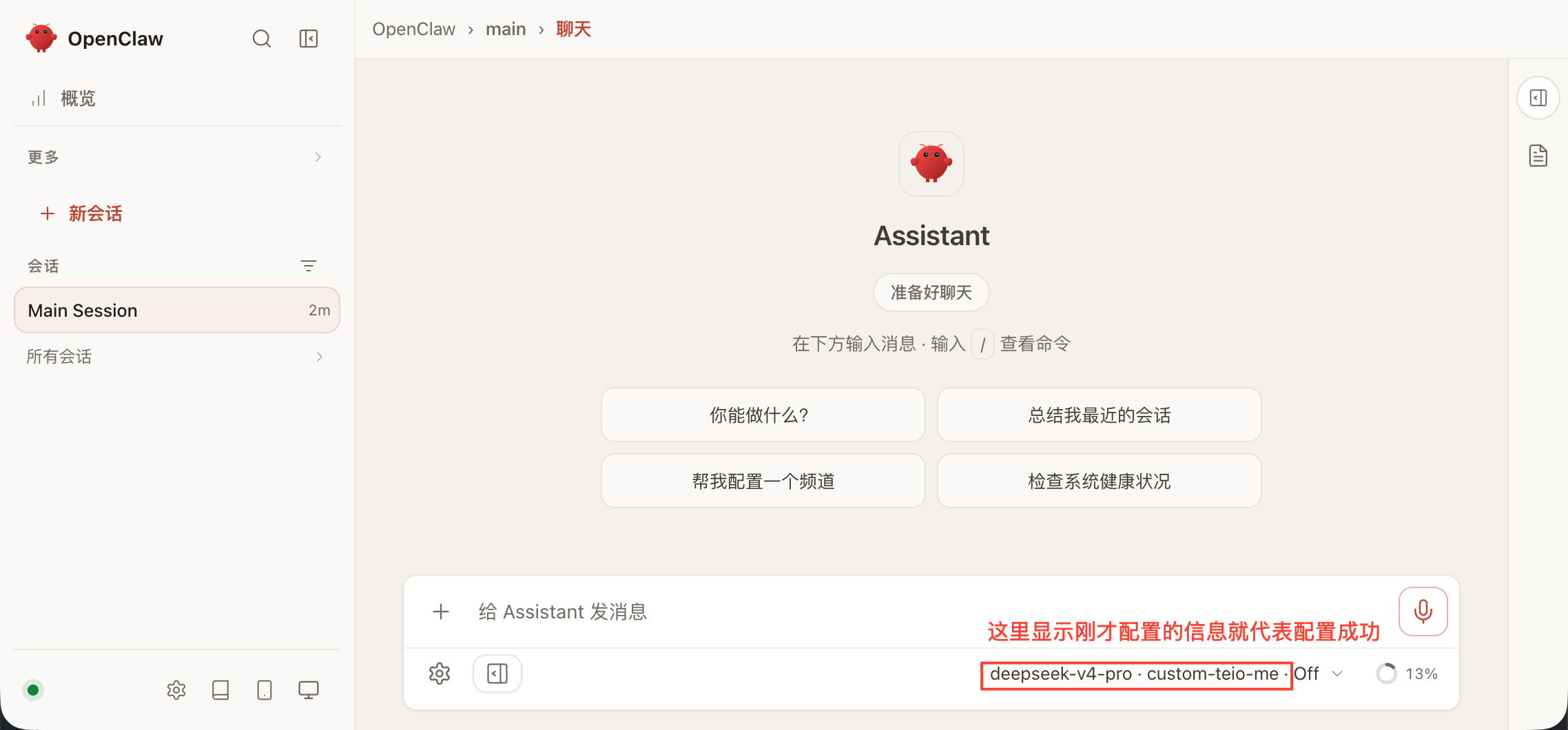
如需使用网页端，请新开一个终端窗口并运行以下命令：

```bash theme={null}
openclaw dashboard
```

如果配置正确，你会进入 OpenClaw 的交互界面，可以直接开始使用。

<Frame>
  <img src="https://mintcdn.com/cdhyzxwl/XCW4VnODSJplAy92/images/Screenshot-2026-08-07-at-15-28-38.png?fit=max&auto=format&n=XCW4VnODSJplAy92&q=85&s=578633897146a3f04fbf694765bd4867" alt="Screenshot 2026 08 07 At 15 28 38" width="2276" height="1060" data-path="images/Screenshot-2026-08-07-at-15-28-38.png" />
</Frame>

遇到问题？请参考 [常见问题](/faq)。